Store & Analyse Results
Introduction
All results generated by benchmarks, along with metadata about those benchmarks, suts and swprofiles, are stored in a “resultstore”. Fastpath supports 3 formats for resultstores. Where ever fastpath expects a resultstore, you can pass a format-specific URL as follows:
CSV:
csv:///<directory>SQLite:
sqlite: sqlite:///<dbfile>MySQL:
mysql://<user>:<password>@<host>:<port>/<dbname>
Note
If the protocol is omitted, the URL is assumed to be pointing to a directory containing all the CSV files for the CSV format.
Note
When using a MySQL resultstore, it is sufficient for a user to have RO access
when performing operations that only require reading data (e.g. fastpath
result list, fastpath result show or when the resultstore is a source
for fastpath result merge). For operations that write data to the
resultstore, the user must have read-write access.
All 3 formats are interchangable; all data can be represented with equal fidelity in all 3 formats, and it is possible to move data between the formats and merge data selectively from multiple resultstores into a single unified resultstore.
List Contained Objects
A resultstore catlogues 3 types of top-level objects; sut, swprofile and
benchmark. Each object instance in the resultstore has an ID, which is used
to refer to that specific object in many contexts; for example when requesting
that fastpath result show or fastpath result merge filters certain
objects.
The following command lists all objects of the specified type, listing their IDs and metadata specific to each object. This example lists swprofiles:
fastpath result list results/ --object swprofile
Additionally you can provide an ID glob to filter the listed objects:
fastpath result list results/ --object swprofile --id *without*
View Recorded Errors
Use fastpath error show to view errors recorded during benchmark execution,
including failures that produced no numerical results. The resultstore URL may
be omitted when the default.resultstore preference is set.
fastpath error show results/ --sut lab-sut --swprofile 6-16-0-rc6
fastpath error show results/ --type 'KMSG_*'
fastpath error show results/ --id 42 --all --format ascii
Filters are repeatable: values within a filter are combined with OR, and
different filters with AND. Matching is case-sensitive. Use exact identifiers
from result list for --sut, --sutclass, --swprofile and
--benchmark. --sut and --sutclass are mutually exclusive.
--user selects an exact user name; --user '' selects untagged errors.
--id selects an exact numeric error ID, --type accepts a glob, and
--session selects an exact session UUID. Error IDs are local to the store.
The default output shows one table per error followed by its complete message,
newest first. --all includes SUT class, rolemap and session UUID.
--no-merge-similar keeps similar metadata objects distinct; use the same
setting with result list when discovering identifiers. Error records
themselves are never merged.
Human-readable formats are pretty (the default), ascii and rst.
Stored terminal controls are displayed as escapes; RST messages are literal
text. Terminal output uses a pager, while redirected output is written directly.
CSV exports always include the metadata shown by --all and preserve
multiline messages:
fastpath error show results/ --format csv > errors.csv
Omit the global --verbose option when exporting CSV because its debug output
also goes to stdout. No matches is successful and produces a short message, or
only the header for CSV. Finding recorded errors also exits successfully;
invalid arguments or an unreadable or incompatible resultstore fail.
Analyse Results
Fastpath’s fastpath result show command can perform a range of analysis on
results in a resultstore. Let’s use the resultstore generated from the tutorial
in Define & Execute a Plan to demonstrate some of the features.
First, let’s look at the summary statistics for all the benchmarks of a single swprofile for a single sut. There is only a single sut in the resultstore so it is implicitly used. We specify the single swprofile we would like to view results for and specify that we want to see the summary statistics relative to the mean. The resulting table shows min/mean/max as well as the confidence interval bounds (95% by default but this can be overridden), the coefficient of variation (that’s the standard deviation expressed as a percentage of the mean) and the number of samples:
fastpath result show results/ --swprofile without-mthp --relative
To restrict the analysis to results generated by a specific user, add
--user. The option may be specified multiple times:
fastpath result show results/ --swprofile without-mthp --relative --user alice

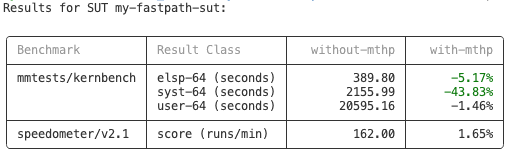
Now let’s compare results between 2 swprofiles. This time we get a summary table that compares the means, and if there are any statistically significant changes, regressions are highlighted in red and improvements are highlighted in green. Here we can see that enabling 64K mTHP in the kernel improved the kernbench benchmark by 5.17% on average. The speedometer benchmark also improved by 1.65% on average, but this is not deemed statistically significant so it is not highlighted.
Note
A change is considered statistically significant if the confidence intervals
(95% by default but this can be overridden) for the 2 results being compared
do not overlap. Additionally the comparison mean must be beyond
noise-threshold percent of the baseline mean. The noise-threshold can
be specified but defaults to 1%. Whether a change is considered an improvement
or regression depends on the measurement. For example times usually improve
when they get smaller, rates usually improve when they get bigger.
fastpath result show results/ --swprofile without-mthp --swprofile with-mthp --relative
fastpath result show supports a number of ancillary options. For example, we
can print the table using only ascii characters. In this case, only ascii
characters are used and instead of coloring the output for improvements and
regressions, the symbols (I) and (R) are displayed. This can be useful for plain
text email and for people with color blindness. Additionally you can filter the
results to show only improvements (See fastpath result show --help for more
options):
fastpath result show result/ --swprofile without-mthp --swprofile with-mthp --relative --format ascii --display improvement
Results for SUT my-fastpath-sut:

+-------------------+-------------------+----------------+-------------+
| Benchmark         | Result Class      |   without-mthp |   with-mthp |
+===================+===================+================+=============+
| mmtests/kernbench | elsp-64 (seconds) |         389.80 |  (I) -5.17% |
|                   | syst-64 (seconds) |        2155.99 | (I) -43.83% |
+-------------------+-------------------+----------------+-------------+
Copy and Merge Data
Fastpath supports the fastpath result merge command to copy data from one or
more source resultstores into a destination resultstore. If the destination does
not exist, it will be created. It is already exists, data is merged with any
existing data; the --append option is required for the latter scenario.
It is also possible to filter the data to be copied/merged based on sut, swprofile or benchmark ids.
See the command help for more information:
fastpath result merge --help